
Running a WooCommerce store often means working with multiple people. Shop managers, customer support agents, and fulfillment staff may all need access to your store. However, not everyone should see the same information.
In the latest update of the Hippoo WooCommerce plugin, we introduced a new Roles and Permissions feature. This allows store owners to control exactly what each user role can access inside the Hippoo WooCommerce mobile app.
With this update, you can decide which parts of the app are visible to different team members.
Why This Feature Is Important
When multiple people manage a store, giving everyone full access can expose sensitive business information. For example, you might not want certain staff members to see sales analytics, financial performance, or total order values.
The new Hippoo permission system solves this problem by letting you define what each role can see in the app. This makes the app safer and more organized for teams.
For example, a support agent may only need to check order status and customer details, while a store manager might need access to analytics and sales performance.
Manage Permissions From the Plugin Settings
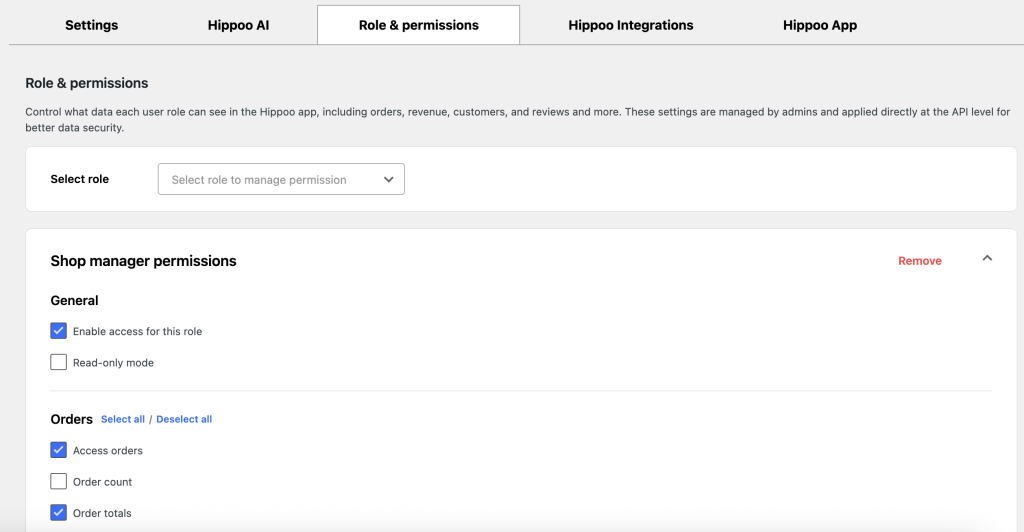
Permissions can be configured directly inside the Hippoo WooCommerce plugin settings in WordPress.
From the settings page, you can select a user role and decide which sections of the Hippoo app are accessible for that role.
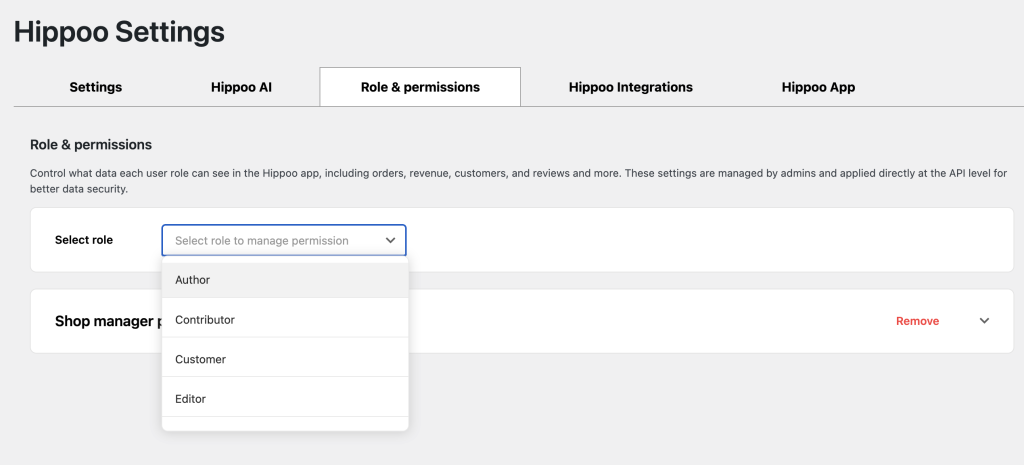
This gives you full control over how different team members interact with your store through the app.
Once the settings are saved, the permissions are applied automatically in the Hippoo mobile app.
Built With API-Level Security
The Roles and Permissions system is implemented at the API level, which improves security.
Instead of simply hiding information in the app interface, restricted roles are prevented from accessing the data entirely. This ensures sensitive store information cannot be retrieved by users who do not have permission.
This approach makes the system both secure and reliable.
A Useful Tool for Teams
This feature becomes especially valuable when multiple people are working on your store. Different team members can focus on their specific tasks without being exposed to unnecessary or sensitive information.
By controlling access to analytics, order details, and other store data, you can create a cleaner workflow and maintain better control over your business.
Available for Hippoo Premium Users
The Roles and Permissions feature is available for Hippoo Premium users. It is designed for store owners who manage teams and want better control over how their store data is accessed in the Hippoo app.